I once plugged a laptop brick into a phone and feared the worst.
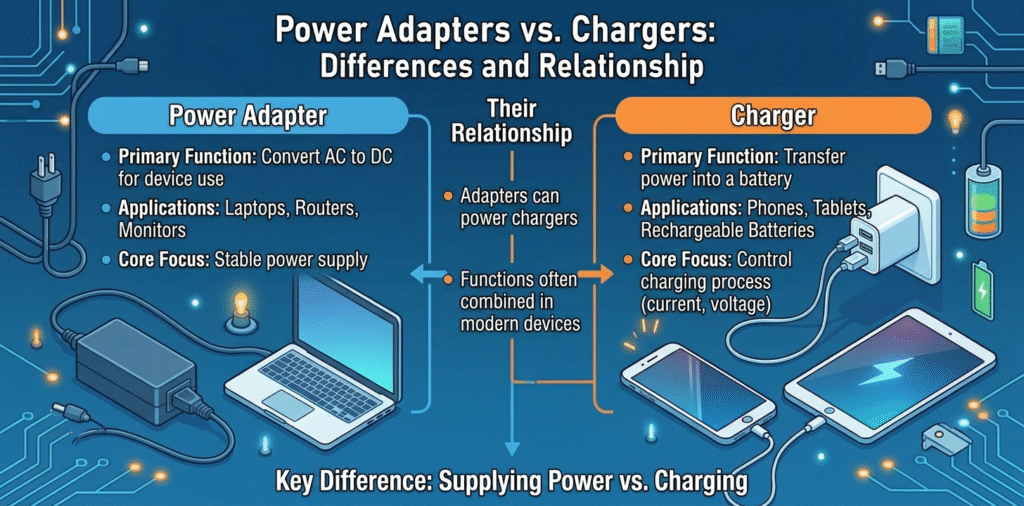
A power adapter[^1] converts AC to DC and offers specific voltages and currents. A charger includes that adapter plus device-side charging circuitry[^2] and communication to manage battery charging[^3] safely.
I learned the hard way to match both sides: the adapter and the device.
Stop here if you only need a short rule. Read on if you want clear distinctions, safe swapping tips, and real risks when you mix adapters and chargers.
What is the difference between a power adapter[^1] and a charger?
I used the terms interchangeably until I broke a cable.
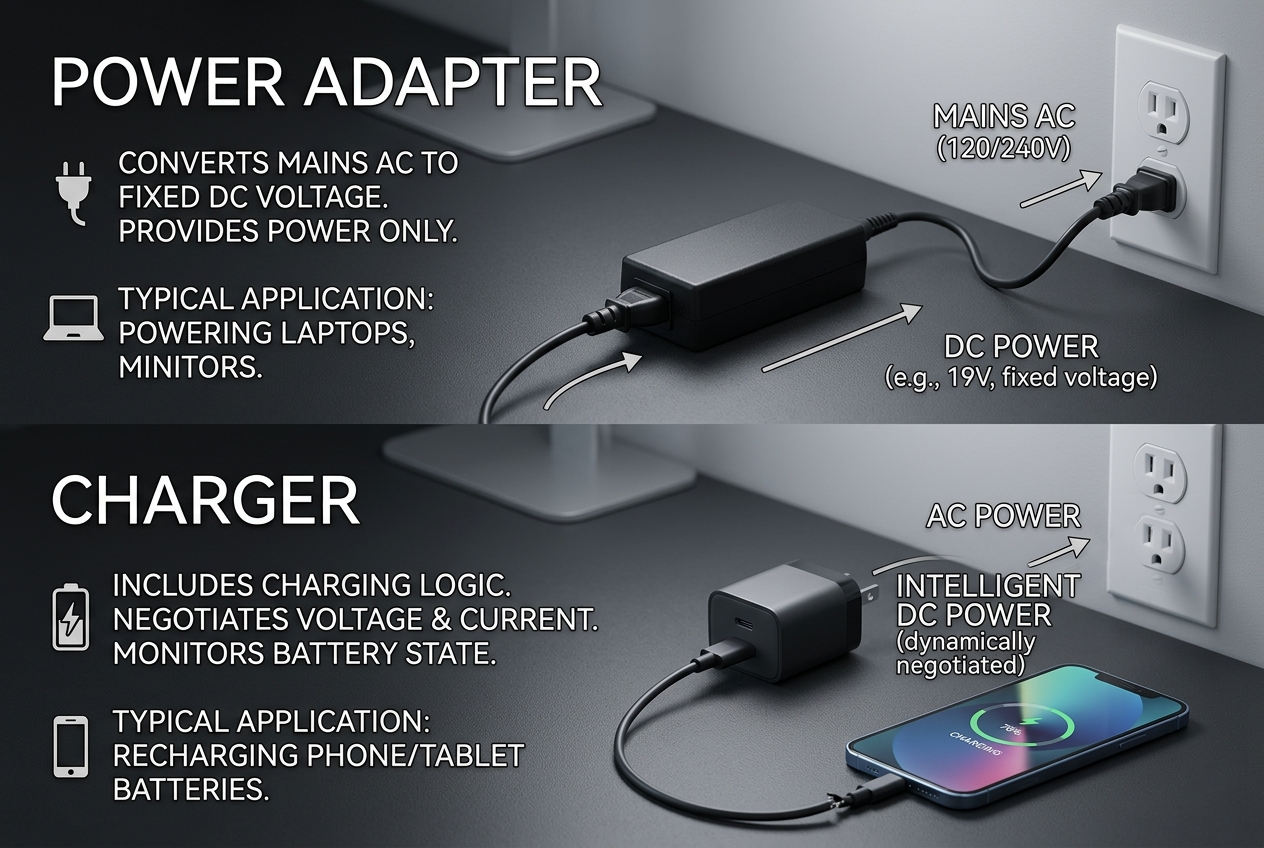
A power adapter[^1], often called a power supply, changes mains AC into DC at a fixed or negotiated voltage. A charger includes charging logic that negotiates current, monitors battery state, and protects the battery.
I keep a list of device input specs before buying adapters.
A power adapter[^1]'s main job is to provide stable DC power. It takes 100–240V AC and outputs a voltage like 5V, 9V, 12V, 20V, or variable profiles via USB Power Delivery[^4] (PD). Many adapters are simple. They only convert and regulate voltage and current to a rated output. A charger is a broader term. It can mean the adapter plus the cable and the device-side charging controller. The charging controller sits inside the phone, tablet, or battery pack. It manages the charging curve. It decides how much current to accept. It balances cell voltages, limits charge near 100%, and cuts power when full. The charger also implements safety: over-voltage, over-current, and thermal detection[^5]. Modern fast charging systems use handshakes. USB PD, Qualcomm Quick Charge[^6], and proprietary protocols let the source and device negotiate voltage and current. In those systems, the adapter can act smart. It offers multiple fixed voltages or variable voltages. The device then requests what it needs. That blurs the line: a smart adapter can act like part of the charger system. But the key difference remains: adapters provide power; chargers manage battery charging[^3] and safety.
Can a power adapter[^1] be used as a charger?
I tried using a spare adapter to top up my phone and it worked—sometimes.
Yes, a compatible power adapter[^1] can charge a device. It must supply the correct voltage, current, and support any required negotiation protocol. Using the right cable and confirmed specs makes this safe.
I always check the device input label and adapter output before I plug in.
A basic fixed 5V adapter will charge many devices that accept USB 5V. That is common for small gadgets. For modern phones and laptops, you must match the charging protocol. For example, many phones expect USB Power Delivery[^4] (PD) or Qualcomm Quick Charge[^6]. If an adapter supports PD, it can negotiate higher voltages like 9V, 12V, or 20V. Then the phone requests the needed profile. If you use a PD adapter with a USB-C to device cable, the phone will usually charge correctly. If the adapter cannot negotiate, the device falls back to a default low current mode or may refuse high-voltage delivery. Also check current limits. An adapter rated for lower amps will charge slower. An adapter rated for higher amps will not force extra current into the device; the device draws what it needs if negotiation is proper. So a higher-rated adapter is fine if it follows the protocol. Use proper cables. A cable that cannot handle the current or lacks data lines for negotiation can limit or break fast charging. In short, a power adapter[^1] can be used as a charger when the voltage, current capability, and communication protocols match the device requirements.
What are the dangers of using a power adapter[^1] to charge a mobile phone?
I once used a mismatched adapter and my phone ran hot for hours.
Risks come from wrong voltage, lack of protocol negotiation, poor regulation, and weak protections. These risks lead to overheating, battery damage, fire, or reduced battery lifespan[^7].
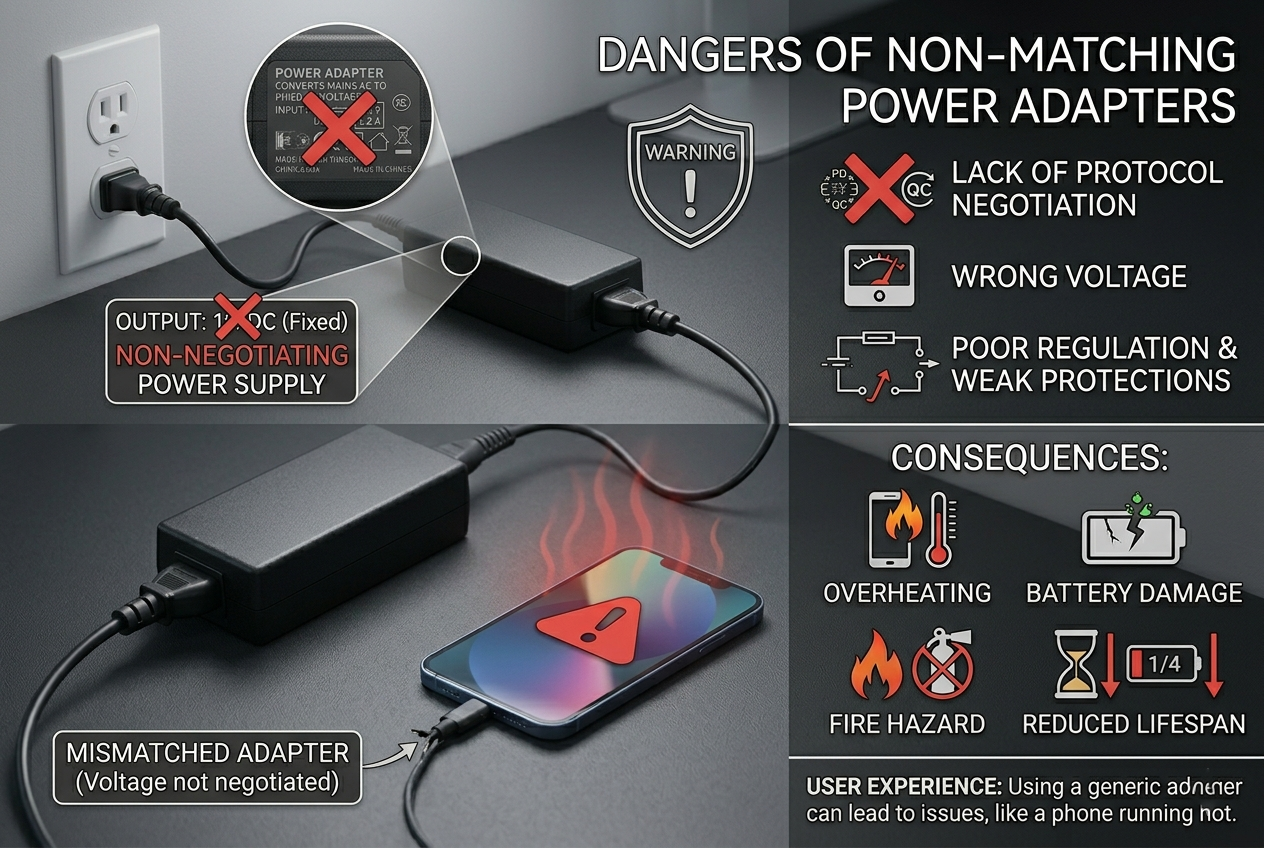
I now avoid unknown adapters and check certification marks before buying.
Wrong voltage or poor regulation
- An adapter that outputs higher voltage than the device expects can over-stress internal components. That causes heat and can damage the battery or electronics. Some devices accept a range, but many do not. Never use an adapter with a higher fixed voltage than the device rating.
Lack of negotiation and current control
- If the adapter cannot negotiate via PD or similar protocols, the device may default to a low current draw or attempt to draw more than the adapter can safely supply. That can overload the adapter, cause voltage drop, or create unstable output. Unstable power stresses the battery and electronics.
Thermal risks
- Poorly regulated or high-current charging increases heat inside the phone. Heat accelerates chemical degradation in the battery. Long exposure to high temperature shortens battery lifespan[^7] and increases chance of swelling.
No safety protections
- Low-cost adapters may skip over-voltage, over-current, and short-circuit protection. That raises the risk of catastrophic failure or fire if a fault develops.
Cable and connector issues
- Using a cable that is damaged or not rated for the current causes resistance heating in the cable. That can melt insulation, degrade connectors, and reduce charging speed. Poor connectors increase contact resistance and heat.
Fake or counterfeit adapters[^8] and forged certifications
- Some sellers fake certification logos. Those adapters may not meet safety tests. They pose higher risk for failure and fire.
Device firmware mismatch
- Some manufacturers design charging profiles tuned to their devices. A third-party adapter may not trigger the intended protective behaviors. That can allow unsafe charging curves.
How I reduce risk
- Match adapter voltage and supported protocols.
- Use quality, certified adapters and cables.
- Prefer adapters with PD, PPS, or manufacturer-approved protocols.
- Avoid adapters with vague specs or fake logos.
- Remove heavy cases during fast charge and avoid charging in hot places.
- Replace damaged cables and avoid cheap knockoffs.
- If an adapter gets hot, stop using it and test with a known-good charger.
Conclusion
Adapters supply power; chargers manage the battery. Use adapters that match voltage, support negotiation, and carry proper protections to avoid heat, damage, and safety risks.
[^1]: Understanding power adapters is crucial for safe device charging and avoiding damage. [^2]: Learn about charging circuitry to ensure safe and efficient battery management. [^3]: Explore the intricacies of battery charging to enhance your device's lifespan. [^4]: Discover how USB Power Delivery optimizes charging for various devices. [^5]: Explore thermal detection to understand how it prevents overheating during charging. [^6]: Find out how Qualcomm Quick Charge improves charging speed and efficiency. [^7]: Discover tips to prolong your battery's lifespan and improve device performance. [^8]: Learn how to spot counterfeit adapters to avoid safety hazards and device damage.